SKU: OT2071-D125 Numéro d’article: AB012 EAN: 4308851007787

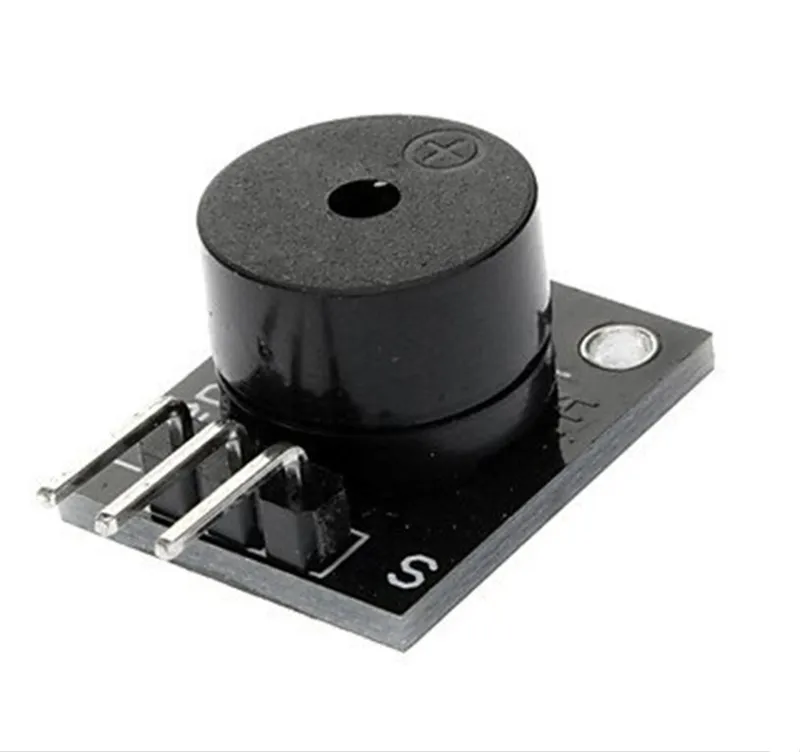
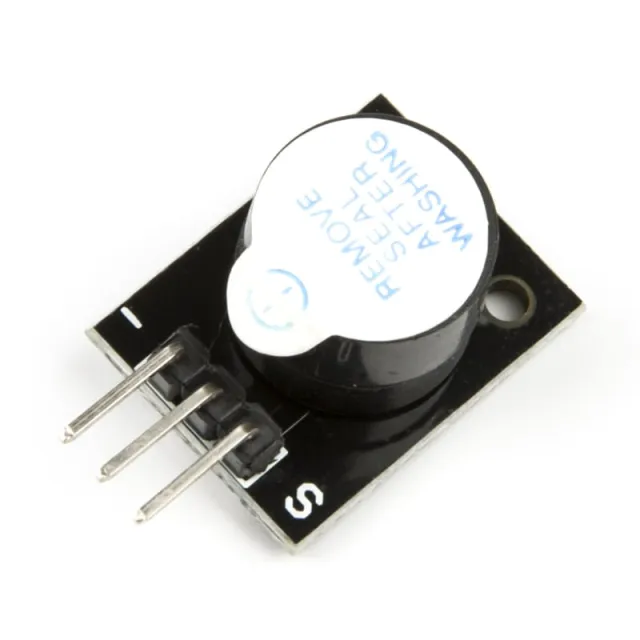
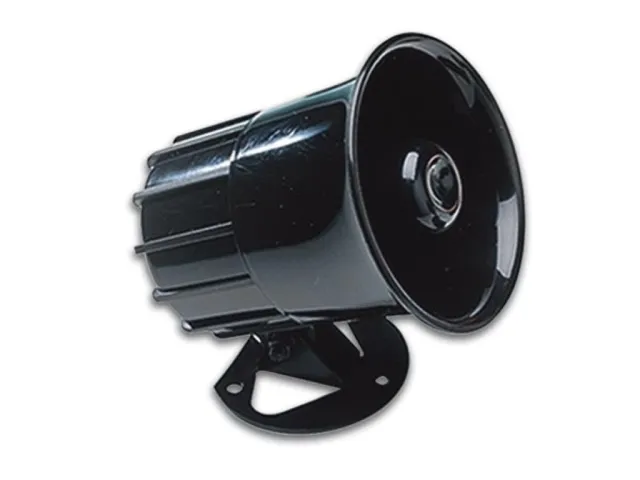
Ce buzzer passif émet un son d’environ 85 dB lorsqu’il est alimenté sous une tension comprise entre 4 V et 8 V. Ce buzzer passif nécessite un microcontrôleur pour produire un son via un signal PWM. Le buzzer consomme env. 30 mA.
Tension : 5 V
Convient notamment pour Arduino
Dimensions
Longueur : 2,5 cm
Largeur : 1,5 cm
Hauteur : 1,1 cm
Voici comment connecter le Module buzzer passif pour Arduino à un Arduino UNO ou à un ESP32, avec un exemple de sketch que tu peux téléverser directement.
Ce projet montre comment générer des sons musicaux avec un module buzzer passif à l'aide d'un Arduino Uno. L'Arduino émet des signaux de fréquence variable via la fonction tone() pour jouer une gamme musicale. Ouvrez le moniteur série à 115200 baud pour voir les fréquences actuellement jouées.
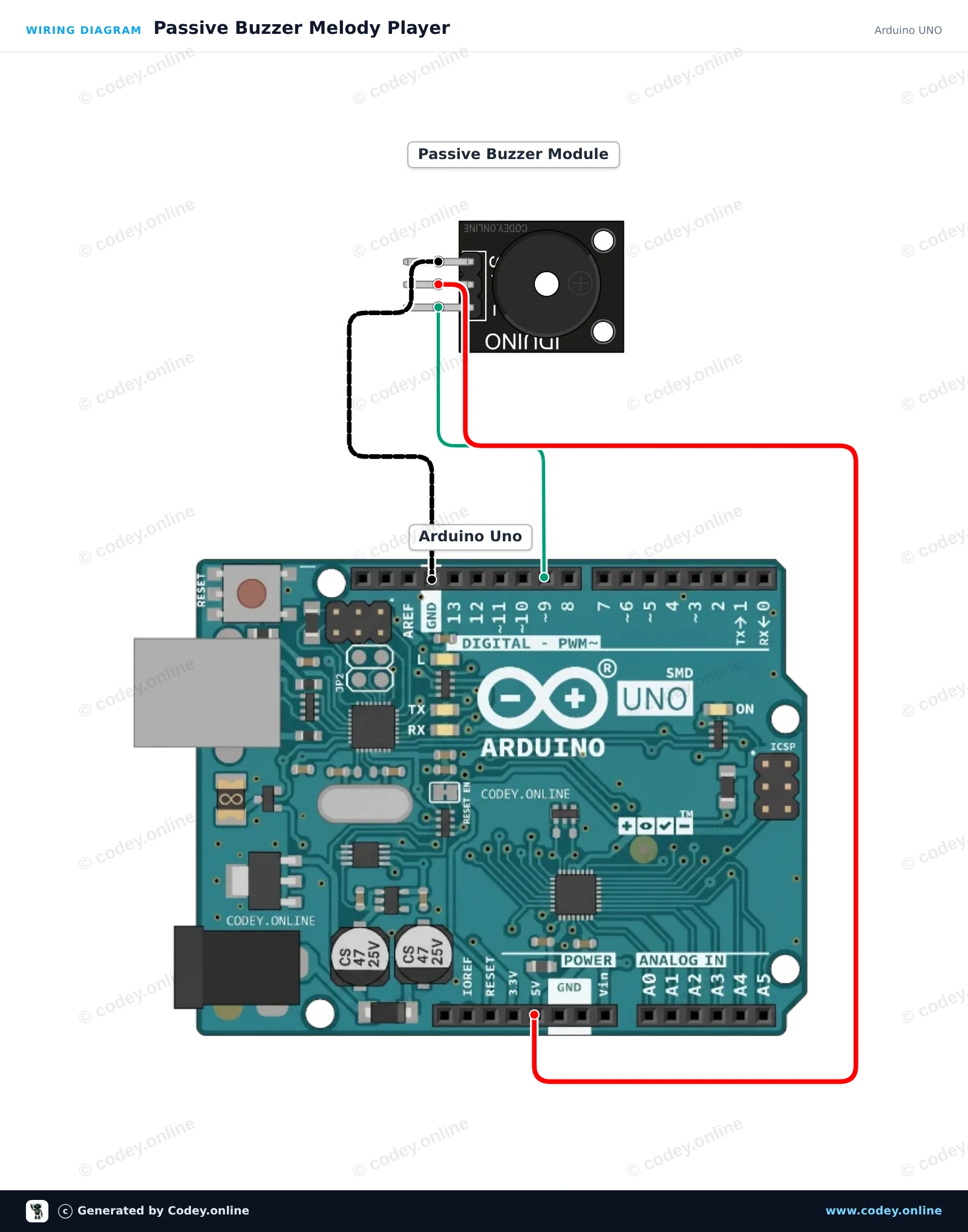
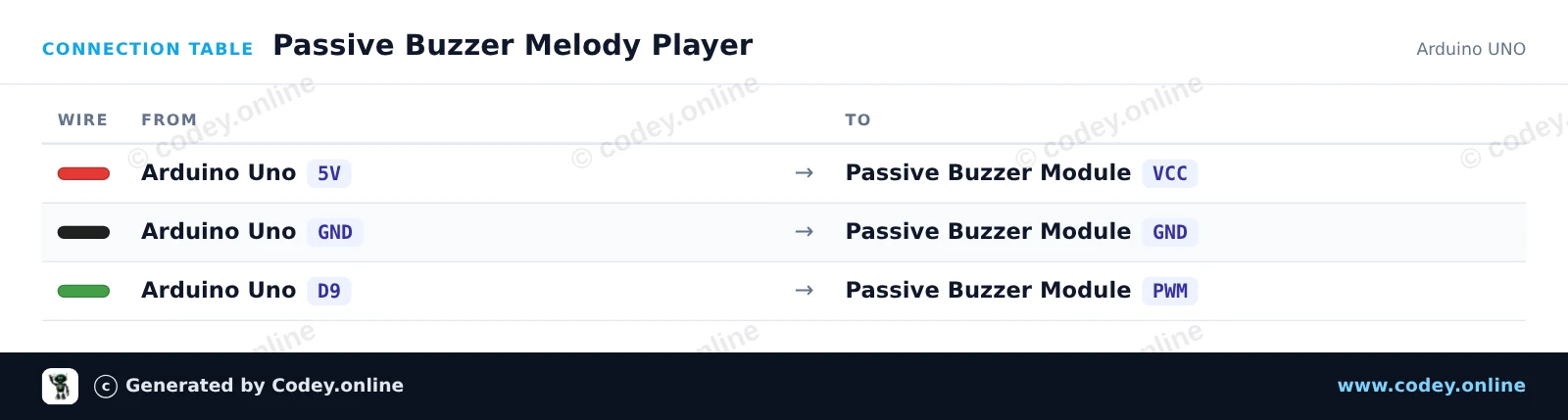
/*
 * ==================================================================
 *  Generated by Codey.online  —  https://www.codey.online
 * ==================================================================
 *  Project   : Passive Buzzer Melody Player
 *  Board     : Arduino UNO (arduino:avr:uno)
 *  Parts     : Buzzer module passief Arduino
 *  Libraries : none (built-in)
 *
 *  Codey Online is an AI-powered browser IDE for Arduino and ESP32.
 *  Describe your project and Codey writes the code, draws the wiring
 *  diagram and uploads it to your board, straight from the browser.
 *  This code is free to use, modify and share, without warranty.
 * ==================================================================
 */

// Passive Buzzer Module Demo on Arduino Uno
const int BUZZER_PIN = 9;

// Musical notes in Hertz (C major scale: C4 to C5)
const int notes[] = {262, 294, 330, 349, 392, 440, 494, 523};
const int noteCount = sizeof(notes) / sizeof(notes[0]);

void setup() {
  Serial.begin(115200);
  Serial.println(F("Passive Buzzer Demo Starting..."));
}

void loop() {
  Serial.println(F("Playing scale ascending..."));
  for (int i = 0; i < noteCount; i++) {
    Serial.print(F("Tone: "));
    Serial.print(notes[i]);
    Serial.println(F(" Hz"));
    tone(BUZZER_PIN, notes[i], 150);
    delay(200);
  }

  delay(300);

  Serial.println(F("Playing scale descending..."));
  for (int i = noteCount - 1; i >= 0; i--) {
    tone(BUZZER_PIN, notes[i], 150);
    delay(200);
  }

  noTone(BUZZER_PIN);
  delay(1500);
}Wiring diagram and example code generated by Codey.online — https://www.codey.online
Cet exemple montre comment générer des sons musicaux avec un module buzzer passif à l’aide d’un ESP32. Le microcontrôleur utilise la génération de tonalités PWM pour jouer en boucle une suite de notes de musique. Branchez directement le module buzzer à l’alimentation, à la masse et à une broche GPIO pour entendre la mélodie.
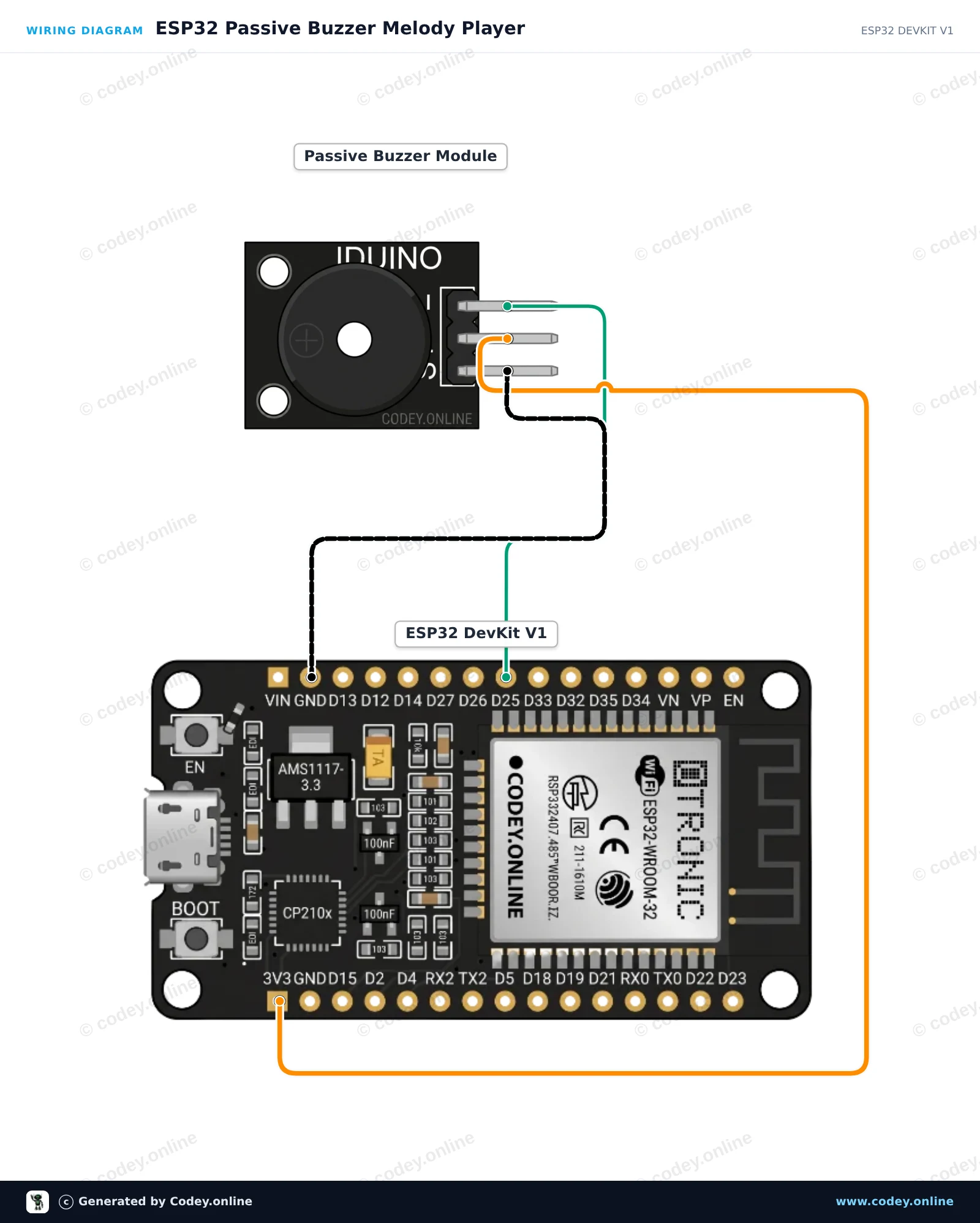
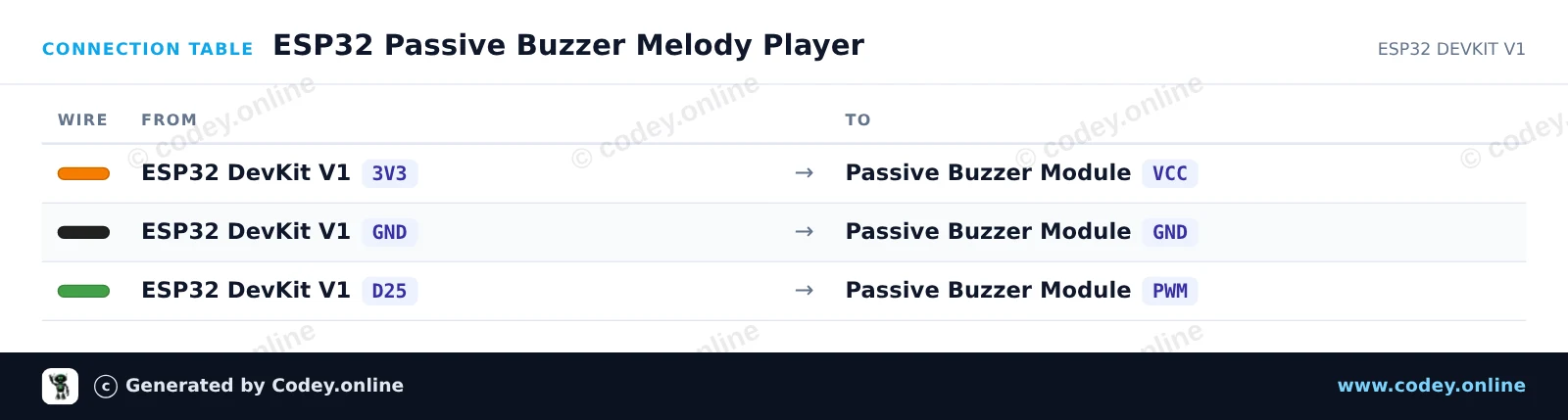
/*
 * ==================================================================
 *  Generated by Codey.online  —  https://www.codey.online
 * ==================================================================
 *  Project   : ESP32 Passive Buzzer Melody Player
 *  Board     : ESP32 DEVKIT V1 (esp32:esp32:esp32doit-devkit-v1)
 *  Parts     : Buzzer module passief Arduino
 *  Libraries : none (built-in)
 *
 *  Codey Online is an AI-powered browser IDE for Arduino and ESP32.
 *  Describe your project and Codey writes the code, draws the wiring
 *  diagram and uploads it to your board, straight from the browser.
 *  This code is free to use, modify and share, without warranty.
 * ==================================================================
 */

// Pin connected to the passive buzzer's PWM input
const int BUZZER_PIN = 25;

// Frequencies in Hz for a simple arpeggio
const int melody[] = {262, 330, 392, 523};
const int noteDurations[] = {250, 250, 250, 400};

void setup() {
  Serial.begin(115200);
  pinMode(BUZZER_PIN, OUTPUT);
  Serial.println("ESP32 Passive Buzzer Demo Started!");
}

void loop() {
  Serial.println("Playing melody...");

  for (int i = 0; i < 4; i++) {
    tone(BUZZER_PIN, melody[i], noteDurations[i]);
    delay(noteDurations[i] * 1.30); // Pause between notes
    noTone(BUZZER_PIN);
  }

  delay(2000); // Wait 2 seconds before playing again
}Wiring diagram and example code generated by Codey.online — https://www.codey.online





 English
  Nederlands
  Deutsch
  Italiano
  Español
  Suomi
Suomi  Polski
  Dansk
Dansk  Ελληνικά
  Български
  Čeština
  Hrvatski
  Aileen