SKU: OT2371-B13 Numéro d’article: NA330 EAN: 8321317104642

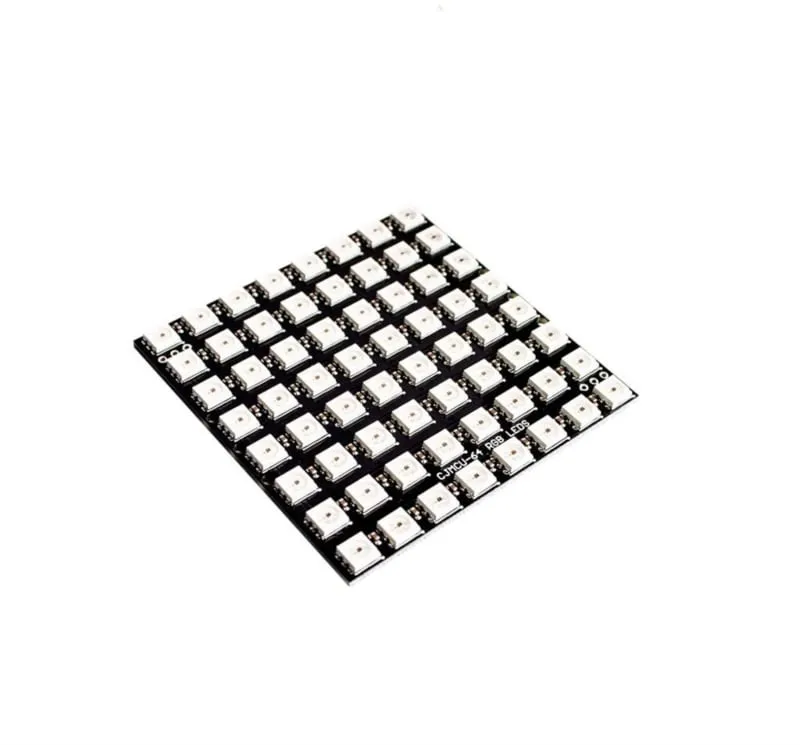
Matrice LED RGB avec 64 LEDs adressables WS2812b.
Fonctionne en 5V et peut être contrôlée via Arduino, ESP8266 et ESP32.
Dimensions
Longueur : 6,5 cm
Largeur : 6,5 cm
Hauteur : 0,3 cm
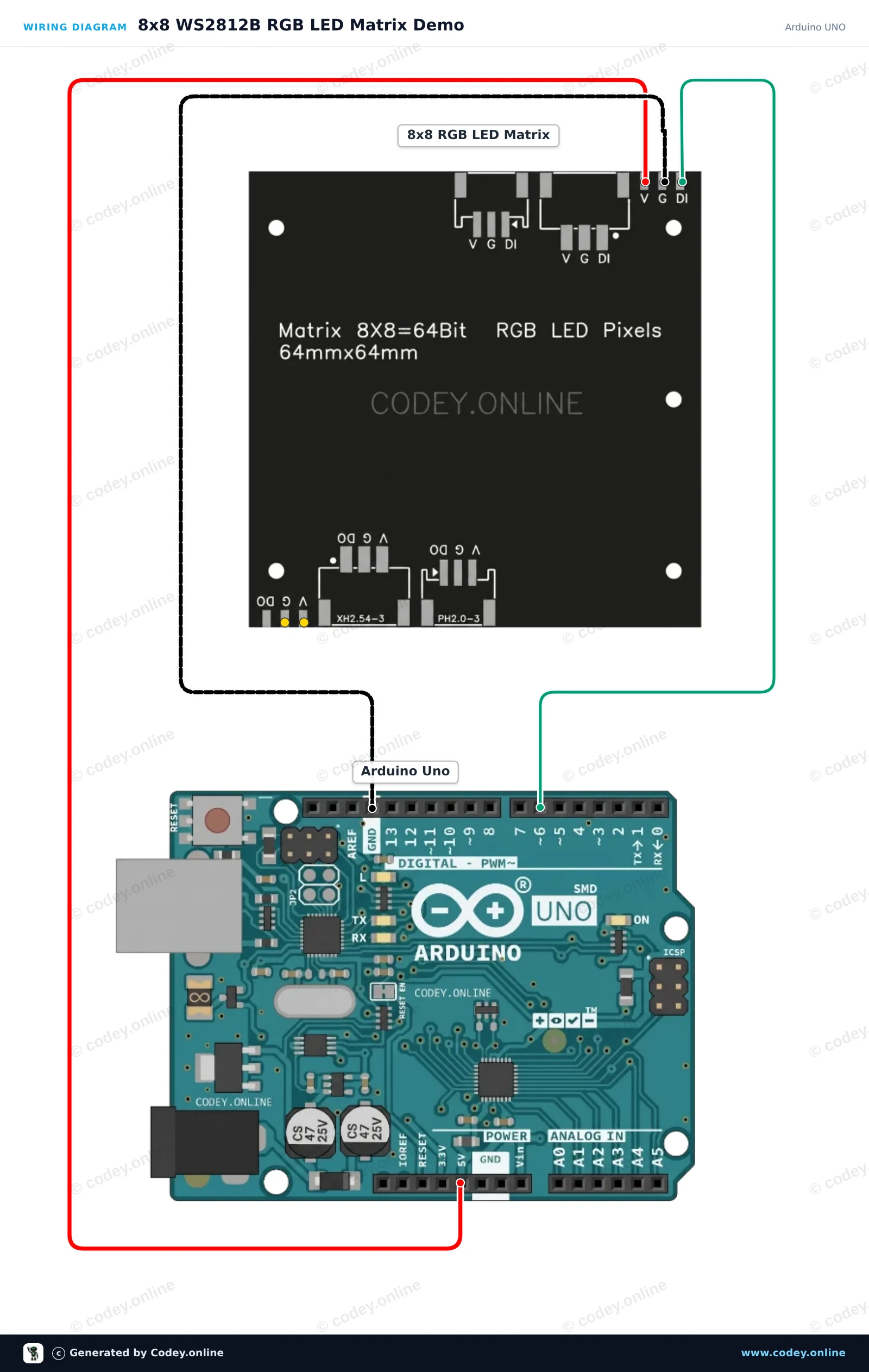
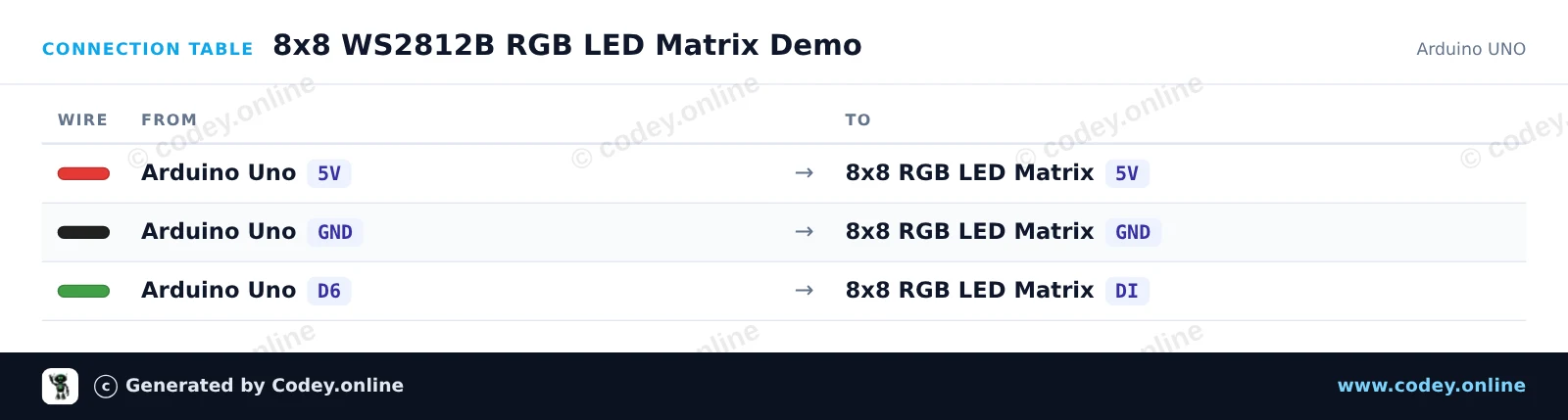
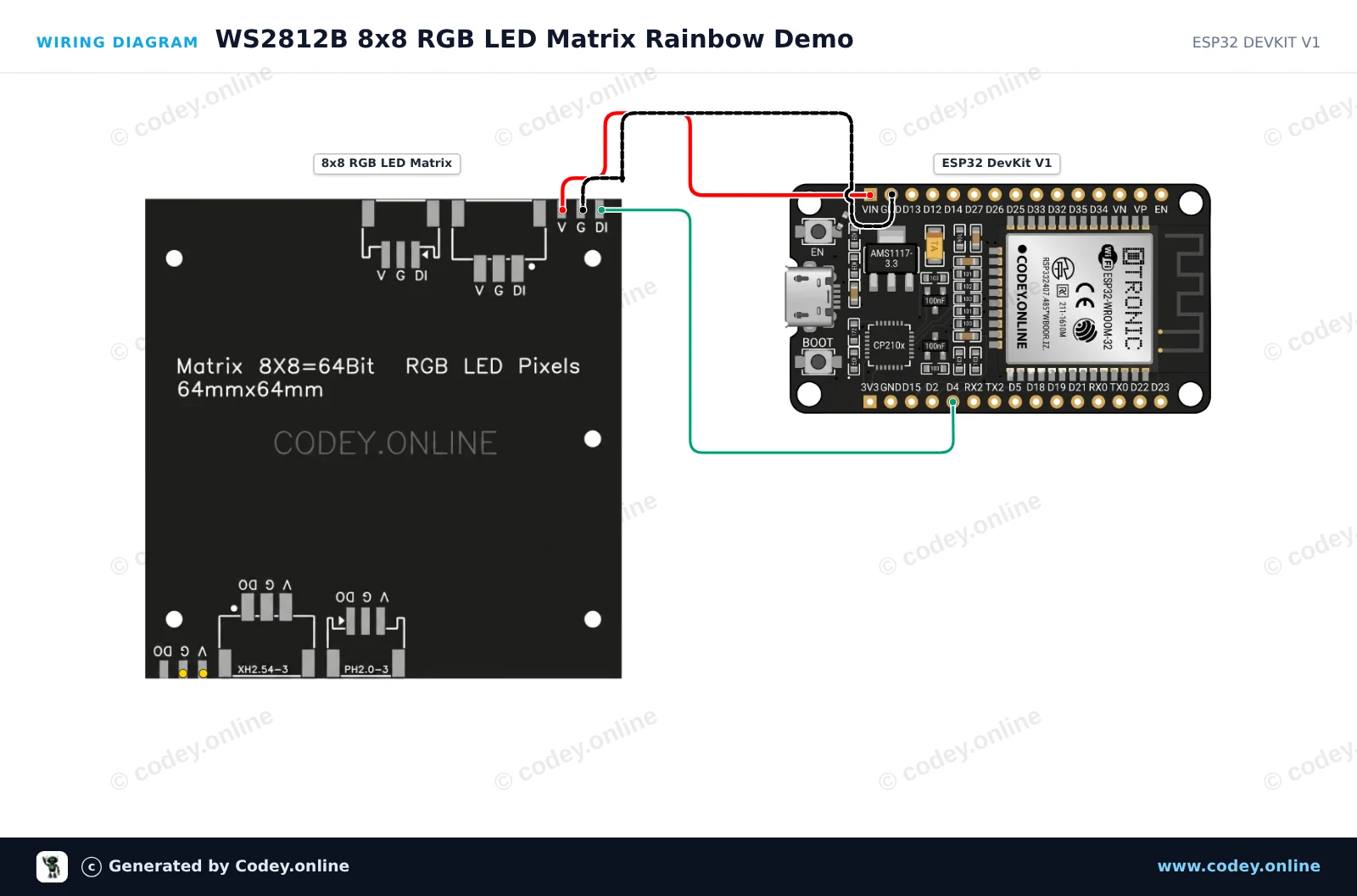
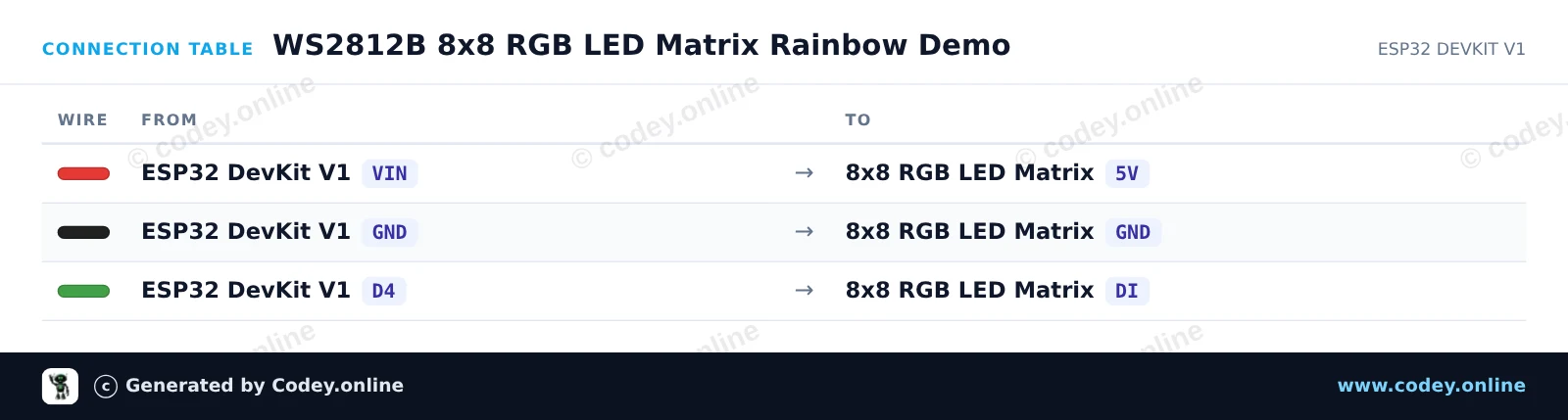
Voici comment connecter le Matrice LED RGB 8x8 de 64 LED 5V WS2812b à un Arduino UNO ou à un ESP32, avec un exemple de sketch que tu peux téléverser directement.
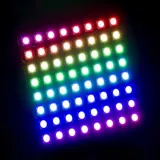
Ce projet présente une matrice LED RGB adressable WS2812B 8x8 connectée directement à un Arduino Uno. Le sketch initialise les 64 LEDs et affiche un motif de couleur rotatif sur la matrice à un niveau de luminosité sûr. Connectez les broches 5V, GND et DI comme indiqué pour tester votre matrice en quelques minutes.
/*
 * ==================================================================
 *  Generated by Codey.online  —  https://www.codey.online
 * ==================================================================
 *  Project   : 8x8 WS2812B RGB LED Matrix Demo
 *  Board     : Arduino UNO (arduino:avr:uno)
 *  Parts     : 8x8 RGB 64 LED Matrix 5V WS2812b
 *  Libraries : Adafruit NeoPixel 1.15.5
 *
 *  Codey Online is an AI-powered browser IDE for Arduino and ESP32.
 *  Describe your project and Codey writes the code, draws the wiring
 *  diagram and uploads it to your board, straight from the browser.
 *  This code is free to use, modify and share, without warranty.
 * ==================================================================
 */

#include <Adafruit_NeoPixel.h>

#define LED_PIN   6
#define LED_COUNT 64

Adafruit_NeoPixel matrix(LED_COUNT, LED_PIN, NEO_GRB + NEO_KHZ800);

// Converts (x, y) coordinates to pixel index (serpentine layout)
uint16_t getPixelIndex(uint8_t x, uint8_t y) {
  if (y % 2 == 0) {
    return y * 8 + x;
  } else {
    return y * 8 + (7 - x);
  }
}

void setup() {
  Serial.begin(115200);
  matrix.begin();
  matrix.setBrightness(30); // Keep brightness low when powered from Arduino 5V
  matrix.show();            // Turn off all pixels
  Serial.println(F("WS2812B 8x8 LED Matrix ready!"));
}

void loop() {
  static uint16_t hueOffset = 0;

  for (uint8_t y = 0; y < 8; y++) {
    for (uint8_t x = 0; x < 8; x++) {
      uint16_t pixelHue = hueOffset + ((x + y) * 65536L / 16);
      uint32_t color = matrix.gamma32(matrix.ColorHSV(pixelHue));
      matrix.setPixelColor(getPixelIndex(x, y), color);
    }
  }

  matrix.show();
  hueOffset += 500;
  delay(20);
}Bibliothèques nécessaires : Adafruit NeoPixel 1.15.5
Wiring diagram and example code generated by Codey.online — https://www.codey.online
Ce projet pilote une matrice LED RGB WS2812B 8x8 à l’aide d’un ESP32. Il fait défiler des motifs arc-en-ciel colorés sur les 64 LED adressables individuellement. La luminosité est réglée bas afin de garantir un fonctionnement sûr directement via l’alimentation USB.
/*
 * ==================================================================
 *  Generated by Codey.online  —  https://www.codey.online
 * ==================================================================
 *  Project   : WS2812B 8x8 RGB LED Matrix Rainbow Demo
 *  Board     : ESP32 DEVKIT V1 (esp32:esp32:esp32doit-devkit-v1)
 *  Parts     : 8x8 RGB 64 LED Matrix 5V WS2812b
 *  Libraries : Adafruit NeoPixel 1.15.5
 *
 *  Codey Online is an AI-powered browser IDE for Arduino and ESP32.
 *  Describe your project and Codey writes the code, draws the wiring
 *  diagram and uploads it to your board, straight from the browser.
 *  This code is free to use, modify and share, without warranty.
 * ==================================================================
 */

#include <Adafruit_NeoPixel.h>

#define LED_PIN    4
#define LED_COUNT  64
#define BRIGHTNESS 30

Adafruit_NeoPixel matrix(LED_COUNT, LED_PIN, NEO_GRB + NEO_KHZ800);

void setup() {
  Serial.begin(115200);
  matrix.begin();
  matrix.setBrightness(BRIGHTNESS);
  matrix.show();
  Serial.println("WS2812B 8x8 Matrix Initialized");
}

void loop() {
  // Rainbow cycle across the matrix
  for (long firstPixelHue = 0; firstPixelHue < 5 * 65536; firstPixelHue += 256) {
    for (int i = 0; i < matrix.numPixels(); i++) {
      int pixelHue = firstPixelHue + (i * 65536L / matrix.numPixels());
      matrix.setPixelColor(i, matrix.gamma32(matrix.ColorHSV(pixelHue)));
    }
    matrix.show();
    delay(15);
  }
}Bibliothèques nécessaires : Adafruit NeoPixel 1.15.5
Wiring diagram and example code generated by Codey.online — https://www.codey.online






 English
  Nederlands
  Deutsch
  Italiano
  Español
  Suomi
Suomi  Polski
  Dansk
Dansk  Ελληνικά
  Български
  Čeština
  Hrvatski
  Aileen