SKU: OT5863 Numéro d’article: XR356 EAN: 8720618489425

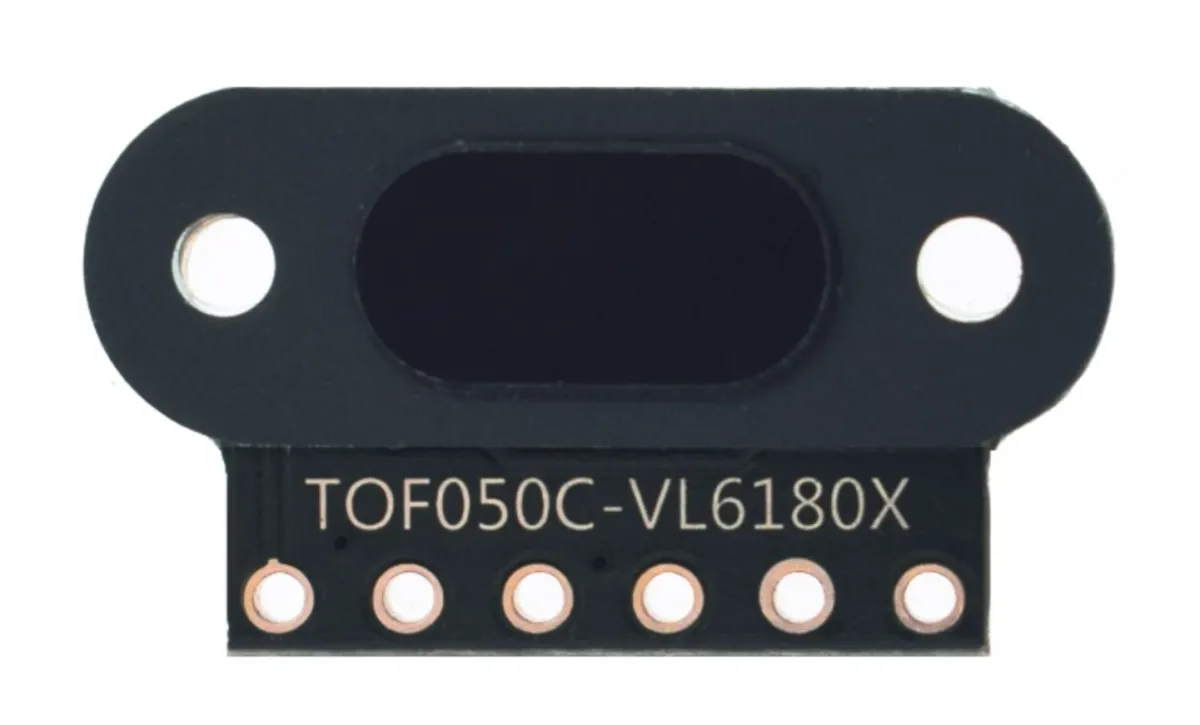
Mini module capteur de distance laser avec une précision de 1mm et une grande portée.
Modèle: TOF050C-VL6180X
Tension: 3V à 5 V
Consommation: 40 mA (max)
Distance: 3cm à 50cm
Connexions:
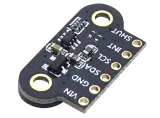
- VIN
- GND
- SDA
- SCL
- INT
- SHUT
Communication: le protocole de communication I2C (entièrement compatible avec un système 3-5 v)
Convient pour Arduino, ESP8266 et ESP32. Fonctionne bien avec la bibliothèque Adafruit_VL6180X.
Plusieurs capteurs sur 1 ligne I2C sont possibles car les capteurs peuvent recevoir un adresse I2C par logiciel.
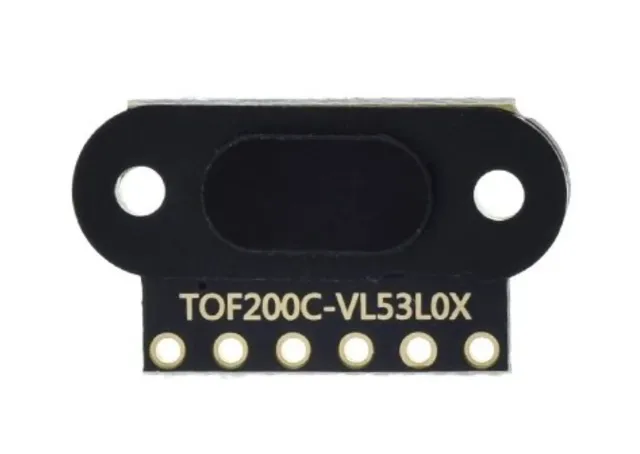
Le capteur laser Time Of Flight VL53L0X est un capteur très précis et fiable qui peut être utilisé pour un large éventail d'applications, notamment la mesure de distance, la détection de mouvement et la navigation.
L'un des principaux avantages de ce capteur est sa précision. Le capteur utilise la technologie laser pour mesurer la distance jusqu'à un objet, ce qui donne un résultat beaucoup plus précis que, par exemple, un capteur infrarouge. Cela rend le capteur par exemple adapté à une utilisation dans les drones, l'automatisation industrielle et les robots.
De plus, le capteur est aussi très facile à utiliser. Il est compatible avec un large éventail de plateformes de microcontrôleurs, notamment Arduino, Raspberry Pi et STM32, et de nombreux exemples et bibliothèques sont disponibles pour vous aider à intégrer le capteur dans votre projet.
Enfin, le capteur est aussi très petit et léger, ce qui le rend facile à intégrer dans un large éventail d'applications. Les 2 trous de vis permettent aussi de fixer ce capteur très facilement et solidement.
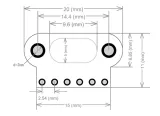
Dimensions
Longueur: 1,3cm
Largeur: 1,04cm
Hauteur: 0,32cm

La lecture charge la vidéo depuis YouTube.
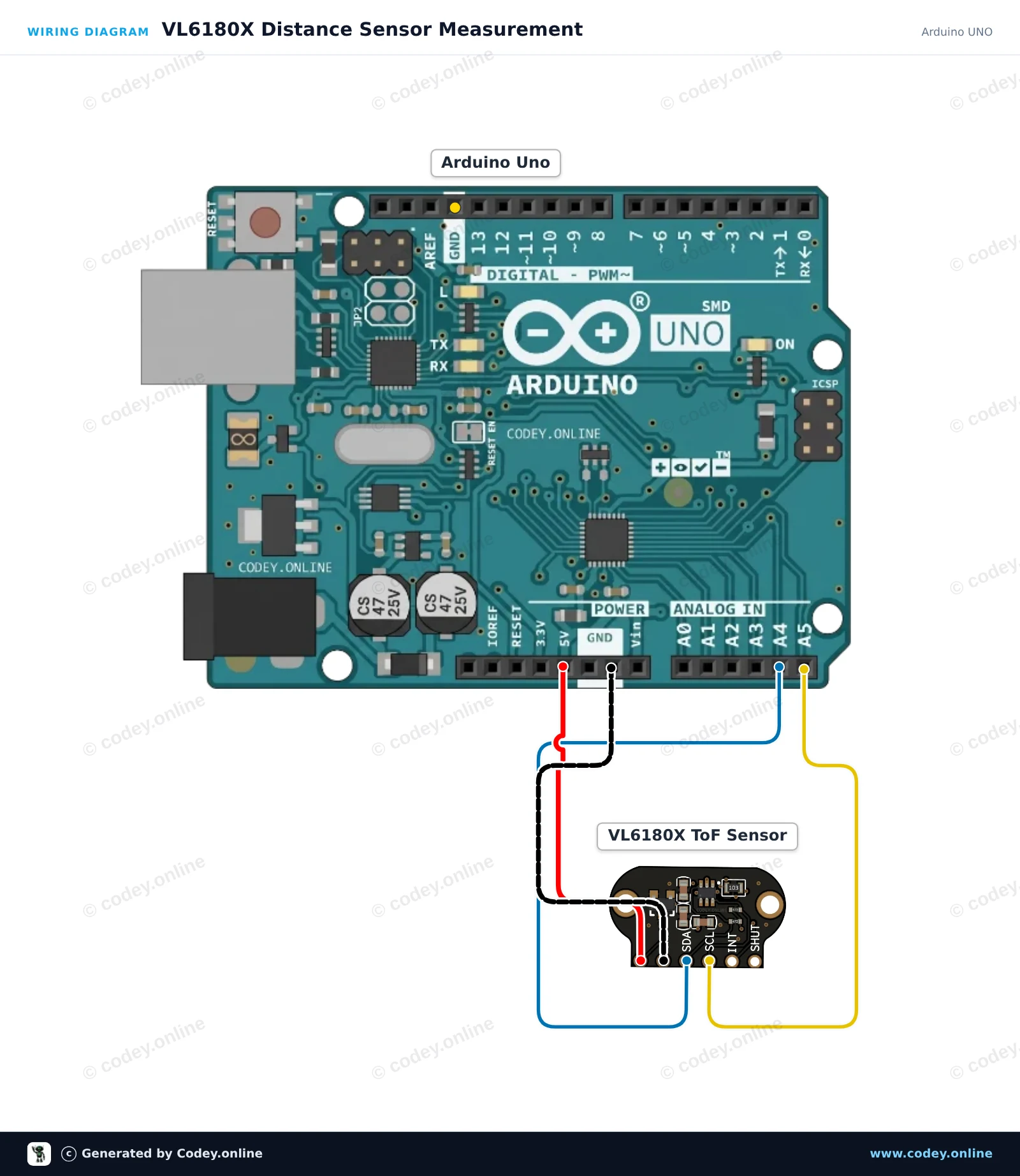
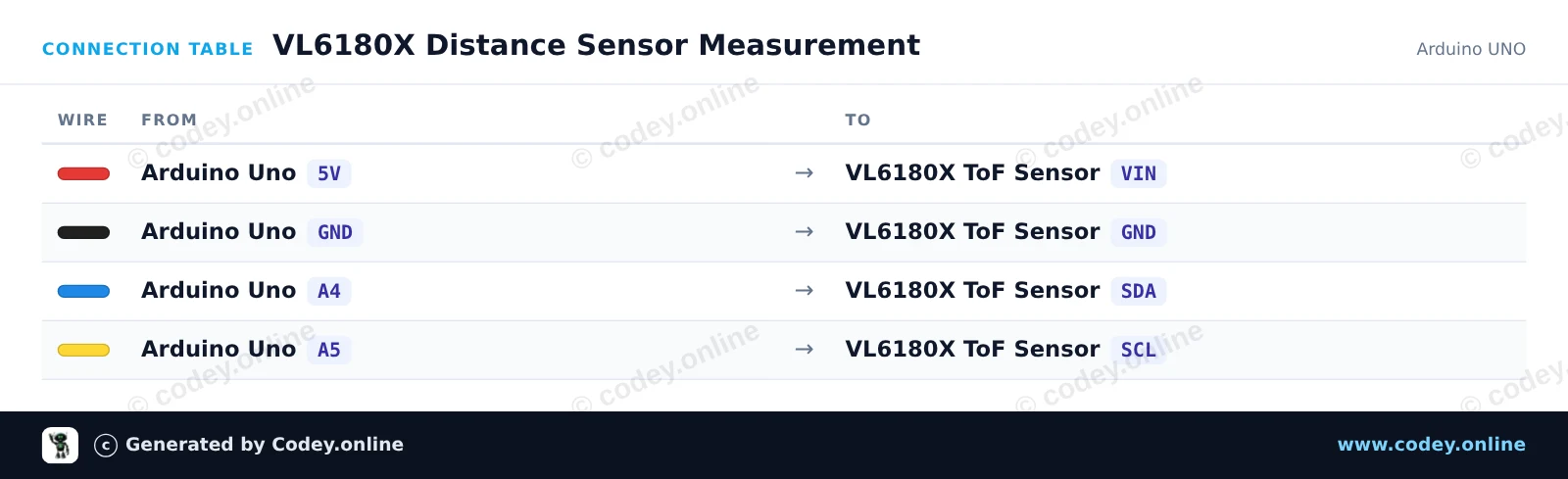
Voici comment connecter le TOF050C-VL6180X Capteur de distance Time-Of-Flight très précis à un Arduino UNO ou à un ESP32, avec un exemple de sketch que tu peux téléverser directement.
Ce projet mesure une distance courte précise (jusqu'à ~200mm) à l'aide du capteur Time-of-Flight VL6180X via I2C. Connectez le capteur à l'alimentation et aux broches I2C, puis ouvrez le Moniteur Série à 115200 baud pour afficher les mesures de distance en temps réel en millimètres.
/*
 * ==================================================================
 *  Generated by Codey.online  —  https://www.codey.online
 * ==================================================================
 *  Project   : VL6180X Distance Sensor Measurement
 *  Board     : Arduino UNO (arduino:avr:uno)
 *  Parts     : TOF050C-VL6180X Distance Sensor Time-Of-Flight high precision
 *  Libraries : Adafruit_VL6180X 1.4.4
 *
 *  Codey Online is an AI-powered browser IDE for Arduino and ESP32.
 *  Describe your project and Codey writes the code, draws the wiring
 *  diagram and uploads it to your board, straight from the browser.
 *  This code is free to use, modify and share, without warranty.
 * ==================================================================
 */

#include <Wire.h>
#include <Adafruit_VL6180X.h>

Adafruit_VL6180X vl = Adafruit_VL6180X();

void setup() {
  Serial.begin(115200);
  while (!Serial) { delay(1); }

  Serial.println(F("Initializing VL6180X sensor..."));
  if (!vl.begin()) {
    Serial.println(F("Failed to find VL6180X sensor! Check wiring."));
    while (1);
  }
  Serial.println(F("VL6180X sensor ready!"));
}

void loop() {
  uint8_t range = vl.readRange();
  uint8_t status = vl.readRangeStatus();

  if (status == VL6180X_ERROR_NONE) {
    Serial.print(F("Distance: "));
    Serial.print(range);
    Serial.println(F(" mm"));
  } else {
    if (status >= VL6180X_ERROR_SYSERR_1 && status <= VL6180X_ERROR_SYSERR_5) {
      Serial.println(F("System error"));
    } else if (status == VL6180X_ERROR_ECEFAIL) {
      Serial.println(F("ECE failure"));
    } else if (status == VL6180X_ERROR_NOCONVERGE) {
      Serial.println(F("No convergence"));
    } else if (status == VL6180X_ERROR_RANGEIGNORE) {
      Serial.println(F("Ignoring range"));
    } else if (status == VL6180X_ERROR_SNR) {
      Serial.println(F("Signal-to-Noise Ratio error"));
    } else if (status == VL6180X_ERROR_RAWUFLOW) {
      Serial.println(F("Raw reading underflow"));
    } else if (status == VL6180X_ERROR_RAWOFLOW) {
      Serial.println(F("Raw reading overflow"));
    } else if (status == VL6180X_ERROR_RANGEUFLOW) {
      Serial.println(F("Range reading underflow"));
    } else if (status == VL6180X_ERROR_RANGEOFLOW) {
      Serial.println(F("Out of range (>200mm)"));
    }
  }

  delay(200);
}Bibliothèques nécessaires : Adafruit_VL6180X 1.4.4
Wiring diagram and example code generated by Codey.online — https://www.codey.online
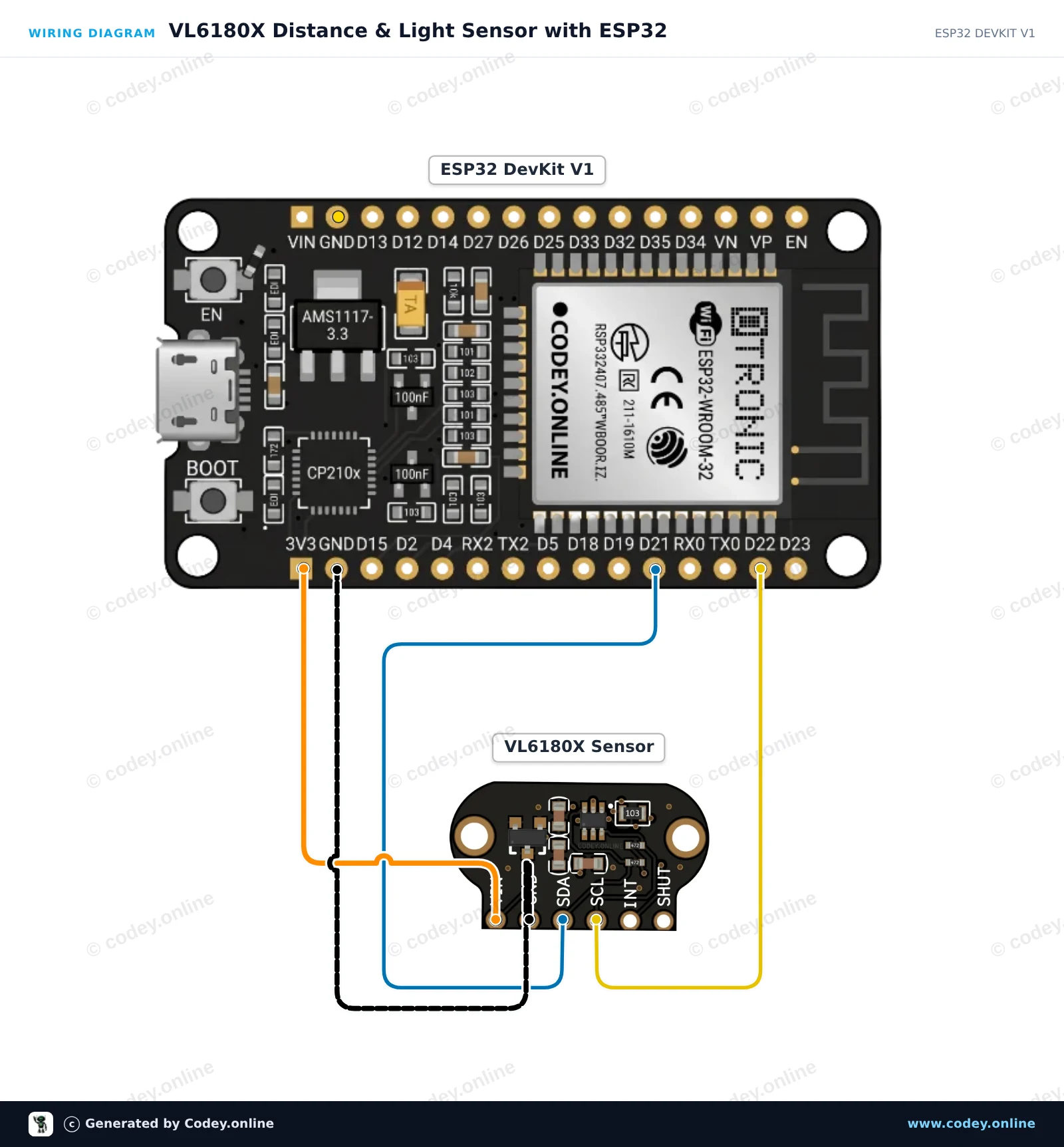
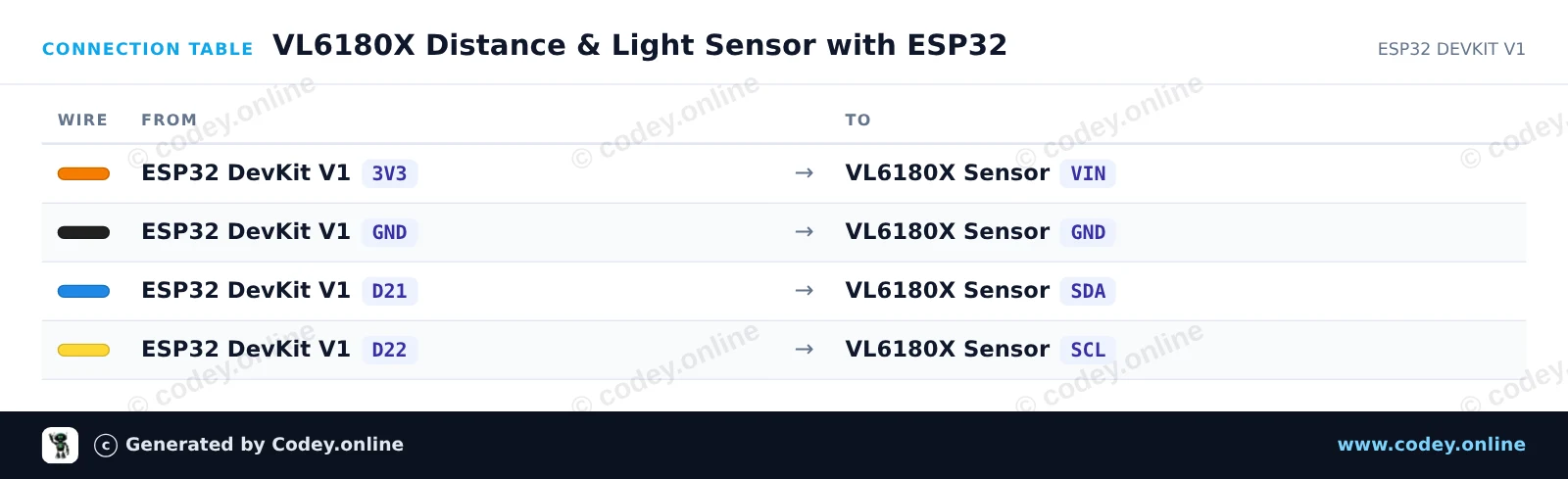
Ce projet mesure la distance à courte portée (0–100 mm) et le niveau de lumière ambiante à l'aide du capteur Time-of-Flight TOF050C VL6180X via I2C. Connectez le capteur directement au 3.3V de l'ESP32 et aux broches I2C par défaut (GPIO 21 et 22). Ouvrez le Moniteur série à 115200 baud pour afficher en temps réel les mesures de distance et de lux ambiant.
/*
 * ==================================================================
 *  Generated by Codey.online  —  https://www.codey.online
 * ==================================================================
 *  Project   : VL6180X Distance & Light Sensor with ESP32
 *  Board     : ESP32 DEVKIT V1 (esp32:esp32:esp32doit-devkit-v1)
 *  Parts     : TOF050C-VL6180X Distance Sensor Time-Of-Flight high precision
 *  Libraries : Adafruit_VL6180X 1.4.4
 *
 *  Codey Online is an AI-powered browser IDE for Arduino and ESP32.
 *  Describe your project and Codey writes the code, draws the wiring
 *  diagram and uploads it to your board, straight from the browser.
 *  This code is free to use, modify and share, without warranty.
 * ==================================================================
 */

#include <Wire.h>
#include <Adafruit_VL6180X.h>

Adafruit_VL6180X vl = Adafruit_VL6180X();

void setup() {
  Serial.begin(115200);
  while (!Serial) delay(10);

  Serial.println("VL6180X Distance & Light Sensor Demo");

  Wire.begin(21, 22);

  if (!vl.begin()) {
    Serial.println("Failed to find VL6180X sensor! Check wiring.");
    while (1) delay(100);
  }

  Serial.println("VL6180X found and initialized!");
}

void loop() {
  float lux = vl.readLux(VL6180X_ALS_GAIN_5);
  uint8_t range = vl.readRange();
  uint8_t status = vl.readRangeStatus();

  Serial.print("Ambient Light: ");
  Serial.print(lux);
  Serial.print(" Lux | ");

  if (status == VL6180X_ERROR_NONE) {
    Serial.print("Distance: ");
    Serial.print(range);
    Serial.println(" mm");
  } else {
    Serial.print("Range Status Error (Code: ");
    Serial.print(status);
    Serial.println(")");
  }

  delay(200);
}Bibliothèques nécessaires : Adafruit_VL6180X 1.4.4
Wiring diagram and example code generated by Codey.online — https://www.codey.online





 English
  Nederlands
  Deutsch
  Italiano
  Español
  Suomi
Suomi  Polski
  Dansk
Dansk  Ελληνικά
  Български
  Čeština
  Hrvatski
  Aileen